Dose
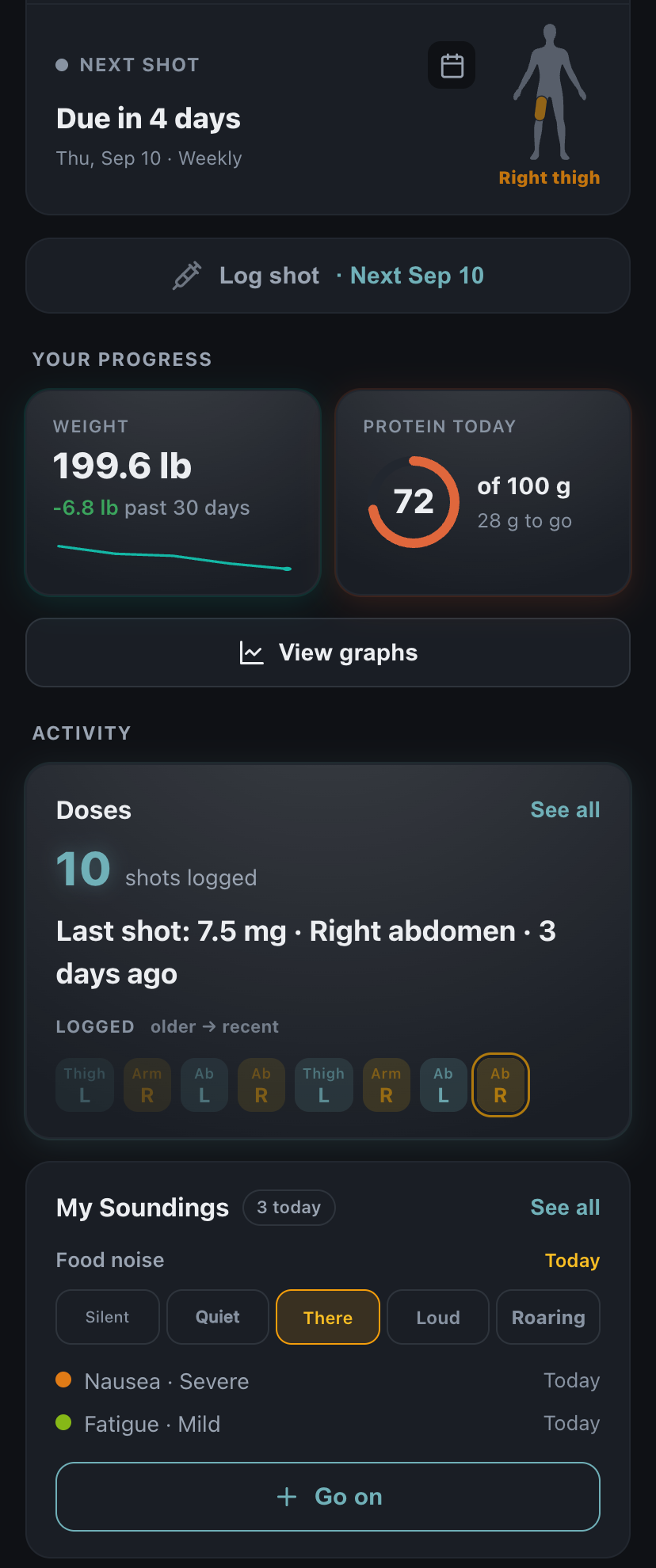
Log the medication, amount, time, and location. See what is next without reconstructing last week.
 DailyQuad
Start today
DailyQuad
Start today
GLP-1 tracking, the DailyQuad way
One quiet place for your dose, how you are feeling, and the pattern over time.
DailyQuad helps you log doses, rotate injection sites, notice food noise and side effects, follow weight and protein, and bring a clear Visit Summary to your prescriber. There are no ads, subscriptions or paywalls, and no account is required to begin.
Free. iPhone and iPad, iOS 15 or later.
Log the dose. Notice how it is landing. See the pattern. Bring it with you.
Log the medication, amount, time, and location. See what is next without reconstructing last week.
Record food noise or one symptom while it is happening, with its own severity and time.
See doses beside food noise, symptoms, weight, protein, estimated medication level, and health measurements.
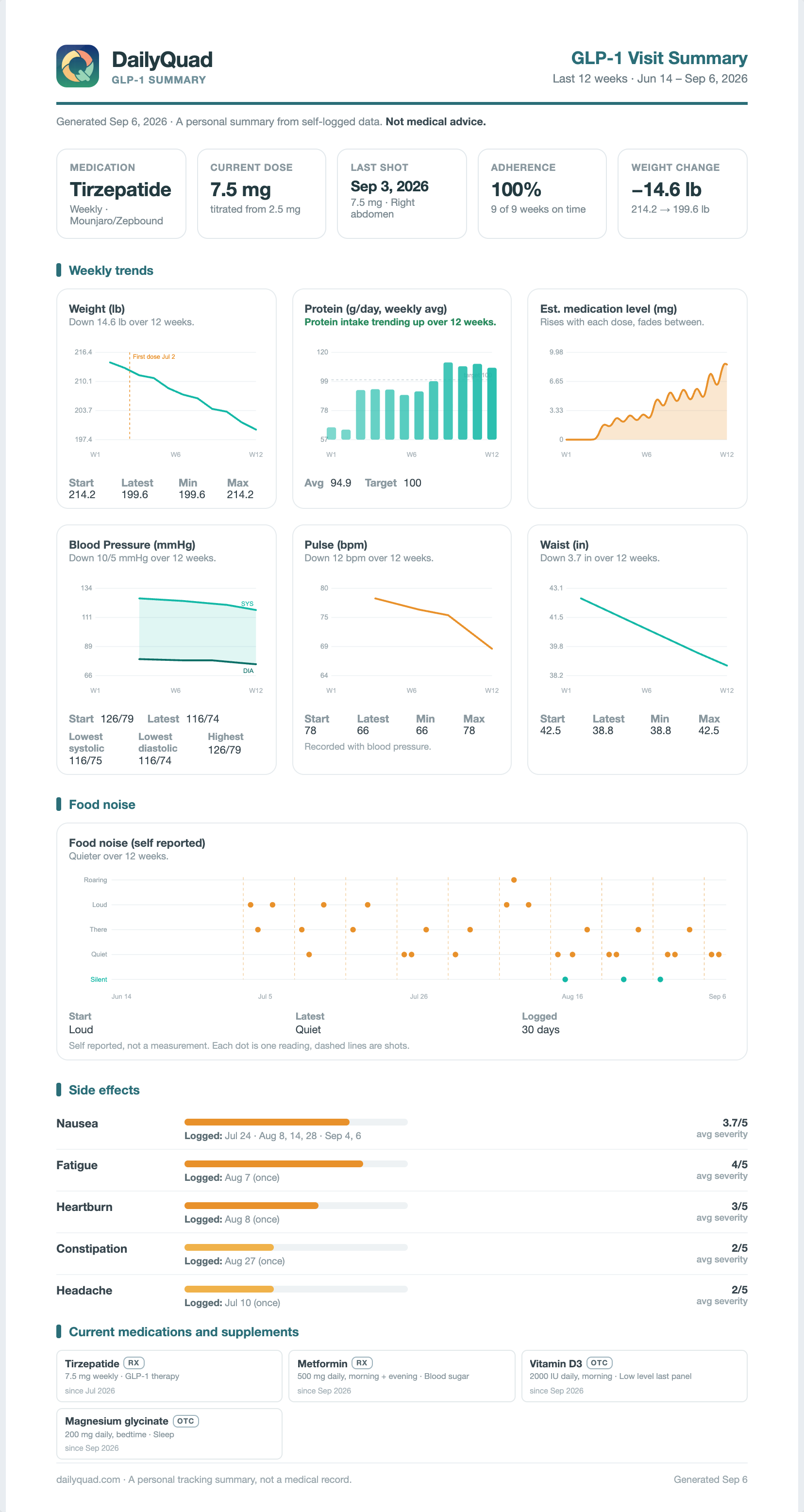
Bring a clean Visit Summary instead of trying to remember the entire month in the waiting room.
Log a shot or pill in a few taps. DailyQuad keeps the date, dose, and history together, shows what comes next, and can remind you when it is due.


My Soundings keeps the noticing light: one quick food noise reading, or one symptom with its own severity, recorded when it matters.
Five words, never a number. Roaring is not a failure and Silent is not a prize. Each is simply what you noticed, on the day you noticed it. Tap the word that fits; tap it again to clear it.

Symptoms are added one at a time, and each keeps its own severity and its own time. Nausea at severe and fatigue at mild stay two separate facts, never one blended number.

A day nobody logged stays visibly empty. It is never filled in as Silent, and it costs you nothing. There is no streak here and nothing to keep up.
In the app, the whole idea fits in one line: “Small signals that help reveal patterns across your dose cycle.” And the main action begins as a question: “What are you noticing?”
One difficult day is not the whole story. DailyQuad places what you recorded on clear timelines, so you can see what changed around dose days and across the weeks.
Every reading appears on the day it happened, exactly where it fell. Long stretches stay readable without quietly dropping what you logged.
No line is drawn through days nobody logged, and nothing is averaged, because Quiet and Roaring do not blend into a value the scale contains. A day you did not log is not a Silent day. It is simply a day the chart leaves open.
Food noise is placed by its word on a scale that reads Silent through Roaring, never folded into a score. Where a reading sits carries the meaning; no position is graded as success or failure. Dose days stand behind the readings as dashed lines, so the weeks take shape around each shot.

Food noise is one timeline among the ones you keep. Dose and adherence, weight, protein, estimated medication level, side effect frequency, blood pressure, and measurements from Apple Health each get the same quiet treatment, and only if you track them.

Medication levels are estimates based on what you logged. They are not blood measurements, and they are not dosing recommendations.
Choose the period and the information that matters, then walk in with a summary short enough to read in the waiting room and complete enough to carry the whole stretch.
It is a personal summary from self logged data, and it says so on the page itself. No predictions, no treatment suggestions, no medical advice. Just what you recorded, arranged for the conversation.

DailyQuad begins with the few things you want to keep showing up for. Protein, water, movement, sleep, or something entirely your own can sit beside your medication without becoming another enormous logging system.
The first screen is Today's Goals, not a medication chart. Protein sits beside water, reading, and a walk, one ordinary thing among the few you chose. GLP-1 is one optional tab, and the day is complete without opening it.

Everything below the four goals is optional and off by default. GLP-1 tracking, metrics, blood pressure, the Pillbox: each waits until you turn it on, and the app is whole without them.
There when you want it, quiet until then:
There is no trial to finish, premium chart to unlock, or subscription waiting later. Every DailyQuad feature is free, and the record you build belongs to you.
Download it and begin. Nothing in the app makes an account feel necessary, because it is not.
Log a dose with no signal at all. Everything catches up when the connection returns.
Ignite, inside the app, adds an email or Apple sign in so your record reaches a second device and outlives a lost phone.
Everything you logged leaves as an Excel workbook or a JSON file, any time you ask.
When you are done, your record can be deleted from inside the app.
Health information is never sold or used for advertising. Nothing here earns money from your record.
Those are the plain words. The binding ones are in the privacy policy.
The full FAQ lives on its own page. These are the three things people check with a thumb over the button.
Yes. Everything is included: doses, Soundings, the graphs, the Visit Summary, export, all of it. There is no trial ending, no premium tier, and no subscription. There are no ads either, so nothing about the app earns money from you.
No. DailyQuad works without one, offline included. An account is optional and does two things: it keeps your record on a second device, and it means the record survives a lost, broken, or replaced phone. You can add one later, or never.
Very likely. DailyQuad tracks semaglutide (Ozempic, Wegovy, Rybelsus), tirzepatide (Mounjaro, Zepbound), liraglutide (Victoza, Saxenda), dulaglutide (Trulicity), exenatide (Byetta, Bydureon), lixisenatide (Adlyxin), and the oral pill orforglipron, along with compounded semaglutide and tirzepatide. Newer medicines still in trials, such as retatrutide and CagriSema, are in the list too, and an Other choice covers anything not named. Doses can be logged in mg, mcg, mL, or units, on daily, weekly, every two weeks, or monthly schedules. DailyQuad supports tracking these medicines and is not affiliated with their manufacturers.
Everything else, from streaks and rest days to Apple Health, is in the full FAQ.
All of it is free. Start today and it simply begins.
Free. iPhone and iPad, iOS 15 or later.